
Ducati Diavel Owners Manual: Indication of range reached for service
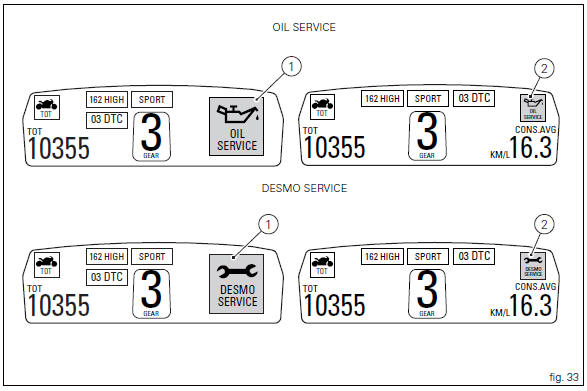
When service coupon threshold is achieved, upon every key- on the system displays the indication of the type of intervention that is required (oil service or desmo service).
The (red) warning is activated as a large icon for 10 seconds upon every key-on (1, fig. 33) Then as a small warning that remains displayed (2, fig. 33) Until it is reset.
After reset, the system will display again the type of intervention required next and the residual range (as described in the previous paragraph).
 Warning
This message can only be reset by the ducati dealer or authorised service centre that performs the maintenance.
 Residual range indication when the service is due
After resetting the first oil service warning (triggered at
1000 km), upon every key-on the system displays the
indication of which type of service should be performed next
(oil service or desmo se ...
 Warning indication (alarms/signals)
The instrument panel activates in real-time some warnings /
malfunction that are not dangerous for the correct operation
of the vehicle.
At key-on (at the end of the check) one or more "warn ...
Other materials:
Throttle valve operation engine
Introduction
The electric motor actuating the throttle valve for the vertical cylinder is
mounted on the throttle body of the diavel, while
a link rod connects the vertical cylinder throttle valve to the horizontal
cylinder throttle valve. In the electric motor, the
throttle valve position se ...
Changing the engine oil and filter cartridge
Note
This operation has to be carried out with hot engine (but turned off)
because the oil in these conditions is more fluid and
its evacuation is faster and complete.
Remove the drain plug (3) with seal (a) from the oil sump and allow the oil
to drain off.
Warning
Dispose of oil and/or fil ...
Refitting the number plate holder
Place the number plate light (5), as indicated, on the number plate holder
plate (8) and tighten the screws (7) to a torque
of 2 nm +/- 10% (sect. 3 - 3, Frame torque settings).
Thread the number plate light wiring (c) into the opening in the number plate
holder plate as shown.
Fit ...