
Ducati Diavel Service Manual: Removing the timing belt driveshaft pulleys
Use the tool code 88713.1805 To hold the driving pulley on the engine crankcase against rotation.
Important
If this operation is carried out with the engine installed in the frame, hold the driveshaft pulleys against rotation using the tool code 88713.2011 Mounted on the alternator cover.
Loosen the nut (15) using the socket supplied with the service tool.
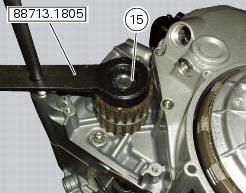
Remove the nut (15), the spacer (20) and the outer pulley (18).
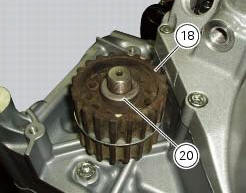
Remove the first woodruff key (16) from the timing belt driveshaft.
Remove the intermediate spacer (19) and the inner pulley (18).
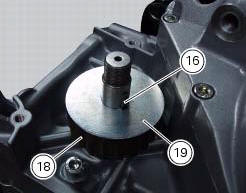
Remove the inner spacer (17) and second woodruff key (16) on the timing belt driveshaft.
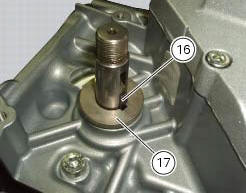
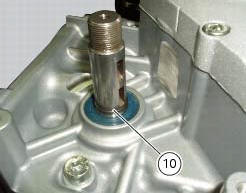
It is now possible to remove the circlip (10) on the driveshaft.
 Disassembly of the camshaft pulleys
Unscrew and remove the screws (22).
Slide off the washer (23).
Withdraw the camshaft pulley (11) from the spacer flange (24).
...
 Refitting the timing belt driveshaft pulleys
To fit the circlip (10) in the driveshaft seat, use the tool code 88713.2834.
Install the inner spacer (17) on the driveshaft, taking care to align the
notch in the spacer with the slot for the ...
Other materials:
Reassembly of the control unit
Insert the control unit (4) into the protecting sheath (5) and position it on
the airbox.
Position the relay supporting bracket (2) by starting and tightening the
screws (1) to a torque of 6 nm +/- 10% (sect. 3 -
3, Frame torque settings), and connect the control unit connectors (3).
...
Coolant temperature
This function indicates coolant indication state.
The temperature unit of measure can be selected (C or f).
The reading is indicated as follows:
if the reading is between - 39C and +39C "lo" is shown flashing on the
dashboard (steady);
if the reading is between +40C and +120C it appears on t ...
Tester power supply
The dds (1) part number 97900.0215 Can be powered from the vehicle as
follows:
From the mains power supply: by connecting the power supply connector
(n) to the network power supply (2) part no.
97900.0224;
From the motorcycle: connecting the corresponding cables (see paragraph
...