
Ducati Diavel Service Manual: Refitting the clutch master cylinder assembly
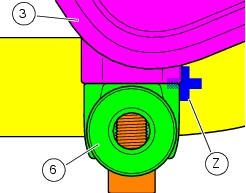
Insert the clutch master cylinder assembly (3) and the clamp (6) on the left handlebar, so that the top mating faces match the mark (z) on the handlebar as shown.
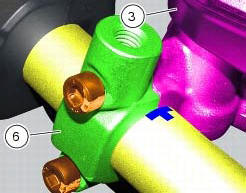
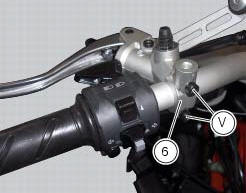
Couple terminal (6) to the clutch master cylinder control and fix them with the screws (v).
Tighten the retaining screws (v) to a torque of 10 nm +/- 10% (sect. 3 - 3, Frame torque settings) following the sequence 1-2-1 starting from the upper screw.
Locate the pipe (4) and seals (2) on the master cylinder assembly (3) and secure it with the special screw (1), without tightening it.
Warning
An incorrectly positioned hose can cause clutch faults and interfere with moving parts.
For the positioning of the clutch hose (4) and retaining clips, see the illustration at the end of this section.
Tighten the special screw (1) to the torque of 23 nm +/- 10% (sect. 3 - 3, Frame torque settings).


 Removal of the clutch master cylinder assembly
Warning
The clutch master cylinder manufacturer advises against servicing of
the clutch master cylinder (1) due to the safetycritical
nature of this component. Incorrect overhaul of this component ...
 Removal of the clutch transmission unit
Warning
The manufacturer of the clutch transmission unit (15) advises
against servicing of its internal parts due to the safetycritical
nature of this component.
Incorrect overhaul of these cri ...
Other materials:
Charging the battery
Before charging the battery, it is recommended to remove it
from the motorcycle.
Important
The battery is housed in the cowling, always contact
a ducati dealer or an authorised service centre for its
removal.
Remove the left cowling (1, fig. 137) Loosening:
side screw (2, fig. 137) Retaining ...
Wiring diagram of the hands free system
The diagram illustrates the inputs, outputs and communication lines used by
the hands free system.
1I - on/off button placed on the hands free system (located below the plastic
cover)
2I - on/off button placed on the bike handlebar rh side
3I - steering position micro-switch
4I - steerin ...
Engine setting function (engine power control)
This function customises engine power and output.
To access the function it is necessary to view the "setting" menu page 48, using
button (1, fig. 14) ?"
"or (2, fig. 14) ?" "select the "riding mode"function
and press the
reset button (12, fig. 12) T ...