
Ducati Diavel Service Manual: Refitting the tail light
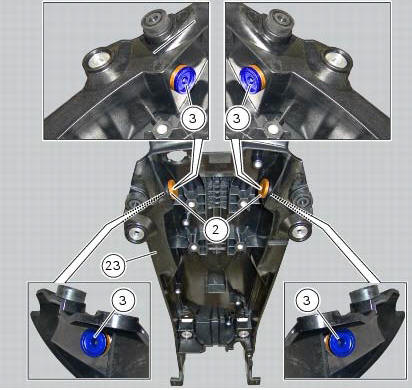
Fit the spacers with collar (3) into the rear vibration dampers (2) located on the gloves compartment (23).
Note
Two spacers (3) must be inserted inside and outside on the right side and two spacers (3) must be inserted inside and outside on the left side.
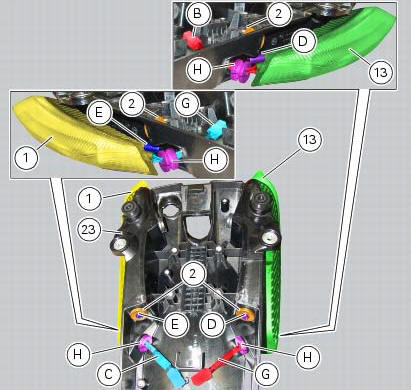
Insert the split vibration damper (h) on the wiring (g) of the left optical unit (13) and the split vibration damper (h) on the wiring (c) of the right optical unit (1).
Note
The usa version uses red optical units (13) and (1).
Fit the left optical unit (13) and the right optical unit (1) on the compartment (23), inserting their pins (d) and (e) into the vibration dampers (2).
Fit the split vibration dampers (h) into the corresponding holes of the compartment (23).
Fit the washers (14) on the screws (4).
Fix the optical units (13) and (1) to the compartment (23) starting the screws (14).
Note
The screws (14) must be inserted into the internal spacers (3) fitted previously.
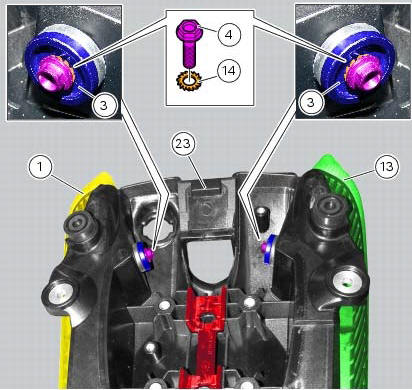
Tighten the screws (4) to a torque of 6 nm +/- 10% (sect. 3 - 3, Frame torque settings).
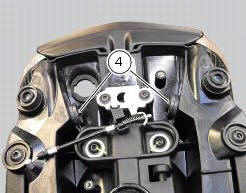
 Removal of the tail light
Disconnect the connectors (a) and (b) of the tail lights (1) and (13).
Loosen the screws (4) and slide the tail lights (1) and (13) to the rear side;
recover the four spacers (3) and the wash ...

Other materials:
Adjusting the steering head bearings
Excessive handlebar play or shaking forks in the steering head indicate that
the play in the steering head bearings
requires adjustment. Proceed as follows:
loosen the clamp screw (1) that holds the steering tube to the steering head.
Slacken the clamp screws (2) securing the steering head ...
Removal of the water pump
Note
For clarity, the figures show the engine removed from the frame.
Loosen and remove the water pump cover (12) fixing screws (13) to the
generator cover (16).
Remove the water pump cover (12).
Clean the pump housing of any scale. Check the bearings wear by turning the
impeller s ...
Reassembling the clutch
Position the spacer (13).
Fit the flat ring (11) and the belleville washer (10) on the clutch center
(12), so that the convex side faces the clutch
drum.
Locate the belleville washer (8).
Apply the prescribed grease to the thread of the gearbox primary shaft and
the mating surfac ...