
Ducati Diavel Service Manual: Refitting the throttle twistgrip
Lubricate the ends of the throttle grip cables (10) and the twistgrip race with the recommended grease.
The closing cable (10) features a writing on the yellow tube, whereas the opening one (10) features such writing on the white tube.
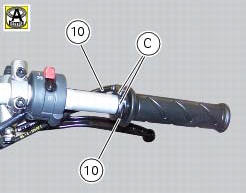
To refit the throttle control components, proceed in inverse order to the removal procedure, making sure that the twistgrip housings locate in the reference hole in the handlebar.
Tighten the screws (b) of throttle twistgrip (6) to a torque of 10 nm +/- 10% (sect. 3 - 3, Frame torque settings).
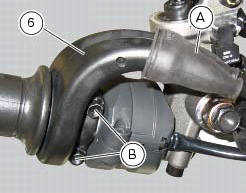
 Removal of the throttle twistgrip
Peel back the rubber sleeve (a) protecting the throttle control cables.
Undo the screws (b) of the throttle grip (6) and open the command.
Disconnect the throttle grip cables (10) by unhooking ...
 Hydraulic clutch control
Special screw
Sealing washer
Clutch master cylinder
Clutch hydraulic pipe (metal braid)
Screw
Spare stand
Washer
Microswitch
Pin
Bleed valve
Screw
Roller
O-ring
Clutch ...
Other materials:
Adjusting the position of the gearchange and rear brake
pedals
The position of the gearchange and rear brake pedals in
relation to the footrests can be adjusted to suit the
requirements of the rider.
Adjust the pedals as follows:
Gear change pedal (fig. 97)
Hold the linkage (1) and slacken the lock nuts (2) and (3).
Note
Nut (2) has a left-hand thr ...
Refitting the clutch-side crankcase cover
Clean and degrease mating surfaces on the clutch-side crankcase half cover
and crankcase and ensure that locating bush
(12) and the o-ring (11), located in correspondence with the oil way, are
installed in the crankcase.
Apply an even, regular bead of ducati liquid gasket (a) on the mating ...
Default function (resetting ducati default parameters)
This function resets the parameters set by ducati for each riding style.
To access the function it is necessary to view the ""setting" menu", using
buttons (1) "s" or (2) "t" select the "riding
mode" function and press the reset button (3) to enter the following page.
Use button (1) "s" or ...