
Ducati Diavel Service Manual: Removing of the side stand

Disconnect connector (a) of the stand switch (2) from the main wiring.
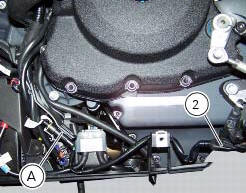
Loosen the screws (3), (10), (11) and (12) securing the stand bracket (4) to the engine and remove the complete side stand assembly.
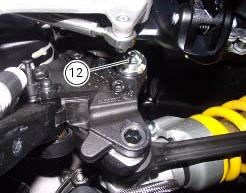
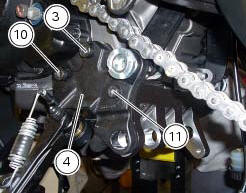
Disassembly of the side stand
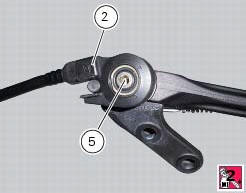
Undo the fixing screw (5) and remove the side stand switch (2).
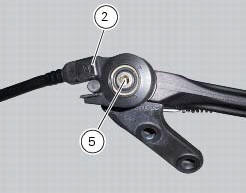
Release the side stand return springs (6) and (7) of the fasteners (a) and (b).
Undo the stand fixing pin (9) to the bracket and remove the side stand (1) and the nut (8).
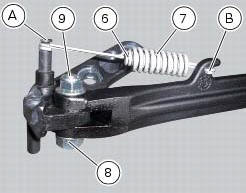
Inspecting the side stand
Fit the side stand leg to the bracket and check that there is no excessive clearance. Ensure that the ends of the side stand are not bent with respect to the shank.
A side stand which shows signs of cracking must be renewed immediately.
To check the switch (2) refer to sec. 6 - 6, Checking the side stand switch.
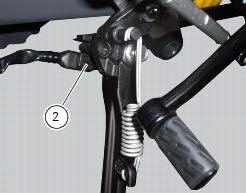
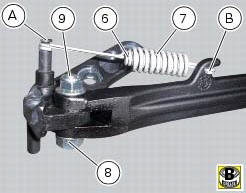
Reassembling of the side stand
Insert the side stand (1), properly greased, in the bracket (4) and fix it with the pivot (9) and the nut (8).
Tighten the nut (8) to the torque of 20 nm +/- 10% (sect. 3 - 3, Frame torque settings).
Position the side stand return springs (6) and (7) and fix them to the fasteners (a) and (b) on the bracket and on the stand.
Set switch (2) to plate (4) by inserting sensor pin (c) into side stand hole (d) and making sure side stand pin (e) matches with groove (f) on sensor.
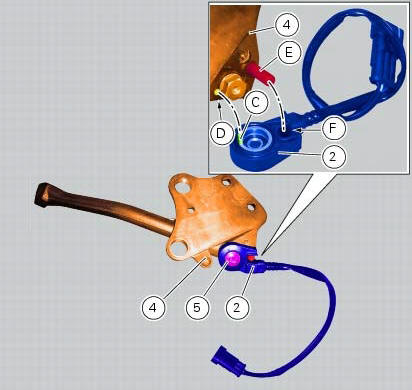
Fit the retaining screw (5) with recommended threadlocker and tighten it to a torque of 5 nm +/- 10% (sect. 3 - 3, Frame torque settings).
 Stands
Side stand
Side stand switch
Screw
Plate
Screw
Inner spring
Outer spring
Nut
Rotation pivot
Screw
Screw
Screw
Nut
Clearance adjuster
Spare parts catalogue
Diavel a ...
 Refitting the side stand
Place the stand plate on the rear shock absorber support; bring adjuster (14)
in line with bracket (s) and start the screw
(12) in the nut behind the bracket (s).
Insert the screws (11), (3) and ...
Other materials:
Total distance covered indicator: "odometer"
This function shows the total distance covered by the vehicle (in km or miles
depending on the specific application).
At key-on the system automatically enters this function.
The odometer reading is stored permanently and cannot be reset.
If the distance travelled exceeds 199999 km (or 19 ...
Crankshaft/connecting rods assembly
Special screw
Connecting rod assembly
Half bearing
Grub screw
Bushes
Crankshaft
Grub screw
Shim washer
Spare parts catalogue
Diavel abs connecting rods
Diavel carbon
abs
connecting rods
Important
Bold reference numbers in this section identify parts not shown in the
f ...
Checking engine oil level
Check the engine oil level through the sight glass (1) on the
clutch cover. When checking oil level, the motorcycle should
be perfectly upright and the engine cold. The oil level should
be between the two marks next to the sight glass. If level is
low, top up with shell advance ultra 4 engine oi ...