
Ducati Diavel Service Manual: Renewal of the cooling fan
Loosen the electro-fan retaining screws (15) and (17) and remove the electro-fan (18) from the radiator.
Carry out the same procedure for the other radiator's electro-fan.
On refitting, position the coolant radiator fan (18) as shown on the fan support (16), so that the three fan holes match the three threaded inserts (i) of the support (16).
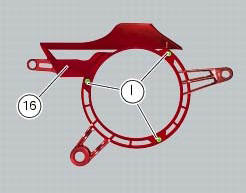
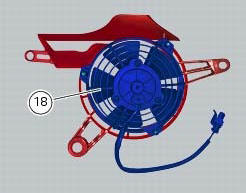
Position the grille (g) as shown on the coolant radiator fan (18), threading the fan cable out of the opening in the grille.
Assemble grille (g), fan (18) and fan support (16).
Tighten the screws (19) to a torque of 1 nm +/- 10% (sect. 3 - 3, Frame torque settings).
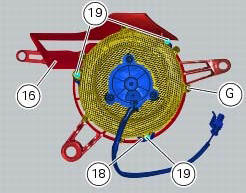
Tighten screws (15) and (17) to a torque of 5 nm +/- 10% (sect. 3 - 3, Frame torque settings).
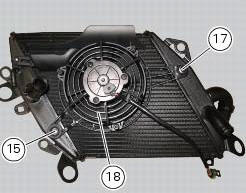
 Disassembling the water radiator unit
The procedure is the same for both radiators.
Loosen the screws (15), (21) and (25) to remove the air duct (24) from the right
radiator (13).
Undo the screws (12) and (14) to remove the ...
 Reassembling the water radiator unit
The procedure is the same for both radiators.
Check the presence of clips (1) at the positions of the external coolant
radiator cover (23).
If removed, fit the front turn indicator (32) on the ...
Other materials:
Overhaul of the flywheel-alternator assembly
Examine the inner part of alternator rotor (24) for signs of damage. Check
that the starter clutch is working properly and
that the needle races do not show signs of wear or damage of any kind. If there
is any malfunction, remove the whole
assembly.
Disassembling the generator flywheel
U ...
Starter motor relay
Introduction
When the rider presses the start button, with all the safety conditions
required to enable engine start met, the engine
control unit enables the relay that activates the starter motor.
Component assembling position
Connection on starter motor relay.
Connection wiring diagram
...
Maintenance indicator
This function indicates that the vehicle is about to or has
travelled a distance for which an authorised ducati service
centre should be contacted to have the general maintenance
or oil change performed.
Maintenance table
First warning - oil service 1000 km
The first warning is activated a ...