
Ducati Diavel Service Manual: Crankshaft/connecting rods assembly
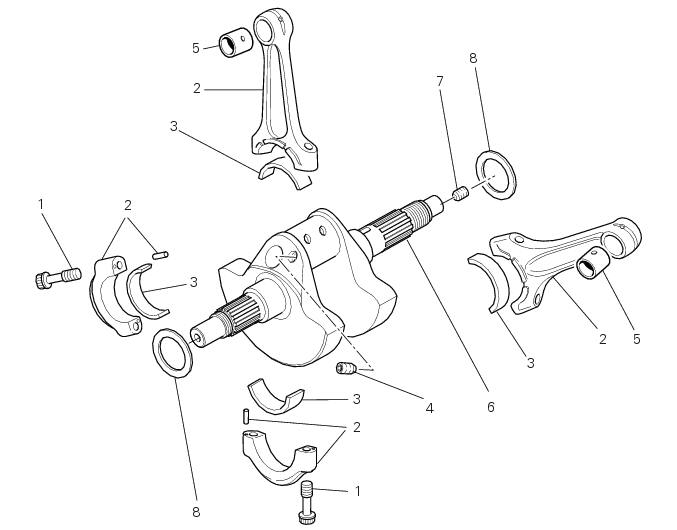
- Special screw
- Connecting rod assembly
- Half bearing
- Grub screw
- Bushes
- Crankshaft
- Grub screw
- Shim washer
Spare parts catalogue
Diavel abs connecting rods
Diavel carbon abs connecting rods
Important
Bold reference numbers in this section identify parts not shown in the figures alongside the text, but which can be found in the exploded view diagram.
- Removal of the crankshaft/connecting rods assembly
- Disassembly of the crankshaft/connecting rods assembly
- Overhaul of the connecting rods
- Reassembly of the connecting rods
- Refitting the crankshaft/connecting rod assembly
 Reassembly of the crankcase halves
If removed, apply threadlocker on the screw (36), insert it with the washer
(37) on the crankcase half and tighten it to The torque of 8 nm
(min. 7 Nm - max. 9 Nm) (sect. 3 - 3, Engine torque sett ...
 Removal of the crankshaft/connecting rods assembly
After separating the crankcase halves, withdraw the crankshaft (6) complete
with connecting rods (2).
...
Other materials:
Brakes
Separate-action anti-lock brake system operated by hall-type
sensors mounted to each wheel, with phonic wheel
detection: abs can be disabled.
Front
Semi-floating drilled dual disc.
Braking material:
steel.
Carrier material:
aluminium.
Disc diameter:
320 mm.
Hydraulically operated ...
Removing of the rear brake control
Warning
The brake master cylinder manufacturer advises against servicing the
brake master cylinder due to the safety critical
nature of this component.
Incorrect overhaul can endanger the rider and passenger.
Maintenance operations on these units are limited to renewal of the following
par ...
How to switch the dashboard on
The dashboard may switched on either from the on/off switch on the handlebar
or from the button on the hands free
system.
With the engine off, the on/off switch is turned to "run off".
With the motorcycle and dashboard off, the on/off switch is turned to "run
off".
To switch the dash ...