
Ducati Diavel Service Manual: Disassembly of rear shock absorber - rocker arm - linkage assembly
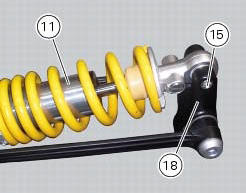
Undo the screw (15) and remove the rear shock absorber (11) from the rocker arm (18).
Undo
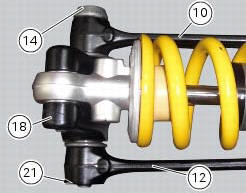
Undo the screw (14) and the nut (21) and remove the linkages (10) and (12) from the rocker arm (18).
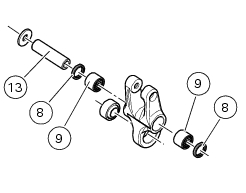
The rocker arm movement is obtained by needle roller bearings (9) rotating on a spacer (13); two seals (8) are placed at the outer ends and keep the lubricant inside the roller cages.
Remove the inner spacer (13), the seals (8) and the needle roller bearings (9) using a suitable punch.
Important
Take care not to damage the bearing housings on the rocker arm while driving out the bearings. Once removed, the seals (8) and needle roller bearings (9) may not be refitted.
 Removal of the rear shock absorber
Loosen the screws (22) and remove the assembly (34) from the frame.
Loosen the screws (27) and remove the tank unit (s) of the shock absorber
from the support (19).
Hold the lh bush (6 ...
 Reassembly of rear shock absorber - rocker arm - linkage assembly
Once the needle roller bearings (9) have been removed from the rocker arm
(18), upon reassembly fit a new needle roller
bearing (9) on drift part no. 88713.1071 And lubricate with recommended greas ...
Other materials:
Reassembling the water radiator unit
The procedure is the same for both radiators.
Check the presence of clips (1) at the positions of the external coolant
radiator cover (23).
If removed, fit the front turn indicator (32) on the cover (23) and tighten the
screws (27) to 2 nm +/- 10% (sect. 3 - 3,
Frame torque settings).
No ...
Adjusting the front fork
The front fork used on this motorcycle has rebound,
compression and spring preload adjustment.
The settings are adjusted using external adjuster screws.
To adjust rebound damping (fig. 109);
To adjust spring preload (fig. 109);
To adjust compression damping (fig. 110).
Park the mo ...
Engine setting function (engine power control)
This function customises engine power and output.
To access the function it is necessary to view the ""setting" menu", using
buttons (1) "s" or (2) "t" select the "riding
mode" function and press the reset button (3) to enter the following page.
Use button (1) "s" or (2) "t" to select the r ...