
Ducati Diavel Service Manual: Disassembly of the generator cover
Undo the three stator retaining screws (25) and the two retaining screws (9) of the two cable grommet bracket (10) from inside the generator cover.
Remove the stator (2) and the cable grommet bracket (10).
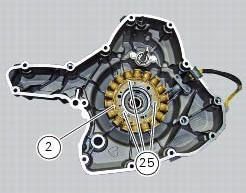
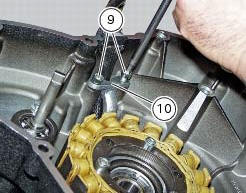
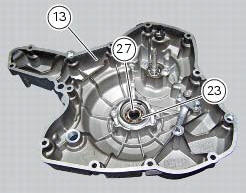
The generator-side crankcase cover is fitted with a bearing (27), held in place by circlip (23), which is located on the end of the crankshaft.
Remove the circlip (23) with circlip pliers.
Remove the bearing (27) using a universal puller.
Be careful when fitting the new bearing (27) to ensure it is positioned with the shielded side facing away from the cover.
Secure the bearing with the circlip (23), ensuring that it is correctly fitted in its seat in the generator cover (13).
Remove the water pump components as described in sect. 9 - 3.3, Removal of the water pump.
 Removal of the generator cover
Note
This operation is described for an engine removed from the frame since all
reassembly procedures are easier with the
engine on the bench.
Disconnect the connector (a) from the generator ...
 Removing the flywheel - generator assembly
Use the tool 88713.3367 Fixed to the m10 side stand fixing holes (d).
Secure the tool to the flywheel with the screws (e).
Unscrew the alternator-flywheel retaining nut (15).
Warning
While uns ...
Other materials:
Overhaul of the cylinder barrel/piston components
Overhauling the cylinder
Check that the walls of the cylinder bore are perfectly smooth. Measure the
cylinder bore diameter at 50 mm from the top
face and determine the size class to which it belongs in accordance with the
values specified in sect. 3 -
1.1Cylinder/piston. Repeat measurement o ...
Clutch cover
Clutch-side crankcase cover
Screw
Screw
Oil level sight glass
Screw
Plate
Bush
Sealing ring
Shim washer
Circlip
O-ring
Locating bush
O-ring
Plug
Sealing washer
Screw
Plug
Panel
Spare parts catalogue
Diavel abs clutch-side crankcase cover
Diavel carbon
a ...
Refitting the exhaust system
Refit the heat guard on the manifold (10) by tightening the nuts (9) to a
torque of 10 nm +/- 10% (sect. 3 - 3, Frame
torque settings).
Position the vertical exhaust manifold (22) on the vertical cylinder head
with the gasket (23).
Tighten the fixing nuts (21) to a torque of 10 nm +/- 1 ...