
Ducati Diavel Service Manual: Refitting the number plate holder
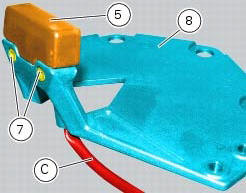
Place the number plate light (5), as indicated, on the number plate holder plate (8) and tighten the screws (7) to a torque of 2 nm +/- 10% (sect. 3 - 3, Frame torque settings).
Thread the number plate light wiring (c) into the opening in the number plate holder plate as shown.
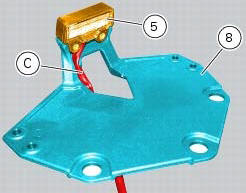
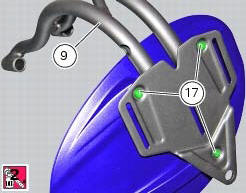
Fit the vibration dampers (15) in the corresponding holes of the number plate holder plate (8). Position the splashguard (16) on the number plate support subframe (9).
Apply prescribed threadlocker on the screw threads (17).
Fix the splashguard (16) by tightening the screws (17) to a torque of 5 nm +/- 10% (sect. 3 - 3, Frame torque settings).
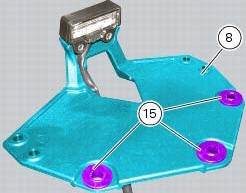
Position the number plate light wiring (c) into the seat in the number plate holder plate (8) as shown.
Insert the connector (d) of the number plate light wiring (c) into the hole (e) in the number plate support subframe (9), threading it out of the hole on the opposite side.
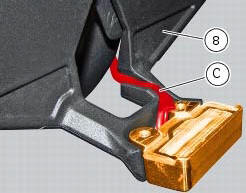
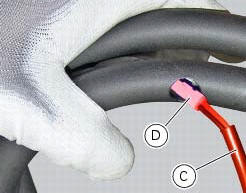
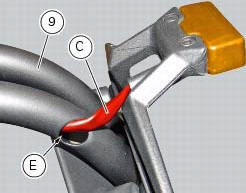
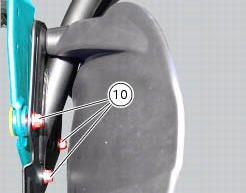
Fit the number plate holder plate (8) to the number plate support subframe (9), fitting the special screws (6) into the vibration dampers and starting the nuts (10) on the opposite side.
Note
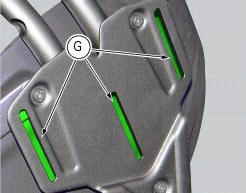
Slide the plate (8) along the slots (g) in the subframe (9) until bringing it all the way towards the bottom side.
Tighten the special screws (6) to a torque of 5 nm +/- 10% (sect. 3 - 3, Frame torque settings), by holding the nuts (10) on the opposite side.
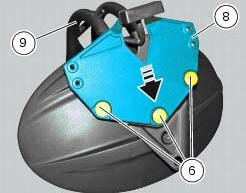
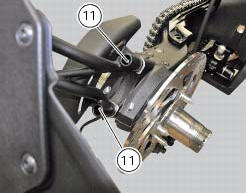
Reposition the assembly on the swingarm and tighten the screws (11) to a torque of 25 nm +/- 10% (sect. 3 - 3, Frame torque settings).
 Removal of the licence plate holder
Disconnect connector (5) of the number plate holder wiring from the main one.
Release the number plate holder light cable from the ties and the cable grommets
as indicated in sect- 7 - 6, fle ...
 Removal of the tail light
Disconnect the connectors (a) and (b) of the tail lights (1) and (13).
Loosen the screws (4) and slide the tail lights (1) and (13) to the rear side;
recover the four spacers (3) and the wash ...
Other materials:
Engine on/off
Warning
Before starting the engine, become familiar with the
controls you will need to use when riding (page 99).
Warning
Never start or run the engine indoors. Exhaust gases
are toxic and may lead to loss of consciousness or even
death within a short time.
In the presence of the active or ...
Refitting the expansion tank
If the support (15) has been removed, place the hose clamps (14) on the
bracket (15) orienting them as indicated.
Fully press the pins (a) to block the clamps (14) until pins surfaces (b) are at
the same level of the clamps (14) surfaces.
Apply recommended threadlocker to the thread of the ...
High beam lights not working
Fault codes
The hi beam light on the (slave) dashboard flashes at 1hz frequency.
Wiring diagram
Location of elements on motorcycle
(A) injection relay; (b) etv relay (throttle valve operating engine); (c)
radiator fan relay; (d) hands free relay.
Fuses located at the rear left of the ...