
Ducati Diavel Service Manual: Removal of the tool tray
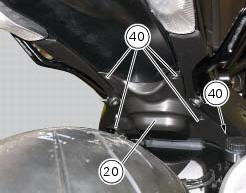
To remove the tool tray unit from the lateral footrests, loosen the screws (40) and remove the splashguard (20).
Undo the screws (15) and remove the cover (16).
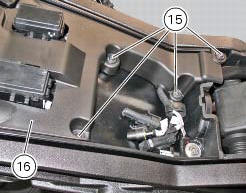
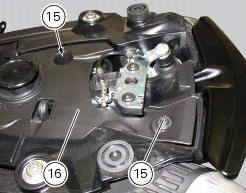
Move the wiring branch from the seat (s) on the tool tray.
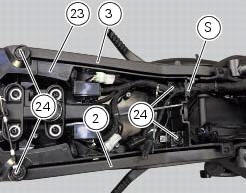
Loosen the screws (24) to remove the tool tray unit (23) from the lateral brackets (2) and (3).
 Disassembly of structural components and the frame
Before carrying out dimensional checks on the frame, you must remove all the
superstructures fitted, referring to the
removal procedures outlined in the sections of this manual.
The rear subfram ...
 Removing the frame and the lateral footrests
Loosen the two special screws (6) to separate the frame (1) from the lateral
brackets (2) and (3).
On the left side of the vehicle block retaining pins (9) and loosen the nuts (8)
on the right ...
Other materials:
Clutch
Screw
Ring
Clutch spring
Pressure plate
Bearing
Circlips
Nut
Belleville washer
Clutch plates
Belleville washer
Flat ring
Clutch centre
Spacer
Clutch lifter
Spare parts catalogue
Diavel abs clutch
Diavel carbon
abs
clutch
Important
Bold reference numbers in t ...
Removal of the crankshaft/connecting rods assembly
After separating the crankcase halves, withdraw the crankshaft (6) complete
with connecting rods (2).
...
Refitting the clutch-side crankcase cover
Clean and degrease mating surfaces on the clutch-side crankcase half cover
and crankcase and ensure that locating bush
(12) and the o-ring (11), located in correspondence with the oil way, are
installed in the crankcase.
Apply an even, regular bead of ducati liquid gasket (a) on the mating ...