
Ducati Diavel Service Manual: Evaporative emissions canister
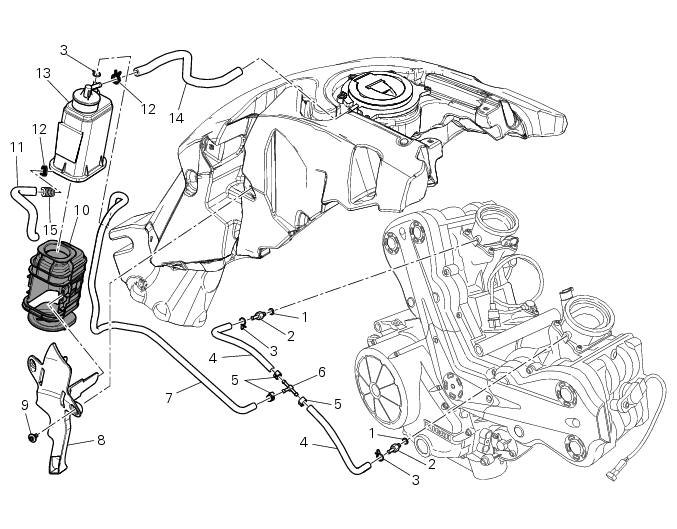
- Sealing washer
- Union
- Hose clip
- Hose
- Clamp
- "T" fitting
- Hose
- Support
- Special screw
- Rubber mounting
- Hose
- Hose clip
- Evaporative emissions canister
- Hose
- Spring
Spare parts catalogue
Diavel abs evaporative emissions canister
Diavel carbon abs evaporative emissions canister
Important
Bold reference numbers in this section identify parts not shown in the figures alongside the text, but which can be found in the exploded view diagram.
- Evaporative emissions canister system (usa versions only)
- Removal of the evaporative emissions canister
- Refitting the evaporative emissions canister
 Refitting the silencer
Position the silencer guard (41) and fix it by starting the screws (40).
Tighten the screws (40) to a torque of 8 nm +/- 10% (sect. 3 - 3, Frame torque
settings).
Insert the silencer (4) int ...
 Evaporative emissions canister system (usa versions only)
Usa models are equipped with an additional system with an evaporative
emissions canister that prevents fuel fumes from
being discharged into the atmosphere.
The breather hose (4) is connected to t ...
Other materials:
Overhauling the front wheel
Wheel bearings
Before checking the dimensions, check the wear on wheel bearings. Check for
wear by hand after cleaning and degreasing
the bearings in their seats.
Turn the inner race.
Check the amount of radial and axial play. Excessive play will cause vibration
and make the bike unstabl ...
Removal of the throttle twistgrip
Peel back the rubber sleeve (a) protecting the throttle control cables.
Undo the screws (b) of the throttle grip (6) and open the command.
Disconnect the throttle grip cables (10) by unhooking the cable ends (c) from
their seats.
Remove the throttle twistgrip (6) from the handlebar.
...
Reassembly of the crankcase halves
The crankcase halves must be in good condition and perfectly clean. The
mating surfaces must be perfectly flat and free
from burrs.
Overhauling the alternator-side crankcase half
The following parts must be present on the internal side of the crankcase
half:
Gearbox secondary shaft bearin ...