
Ducati Diavel Service Manual: Reassembly of the gearbox shafts
Figure 1 shows all the parts to be reassembled on the gearbox primary shaft (2), with the calculated end shims (1) and (11) (sec. 9 - 9.2, Reassembly of the crankcase halves).
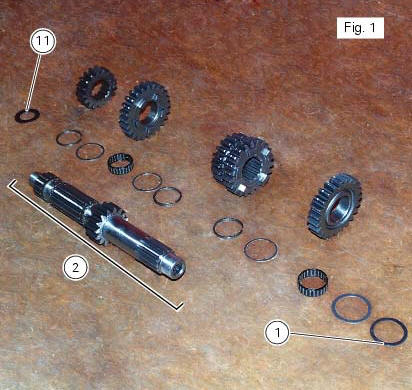
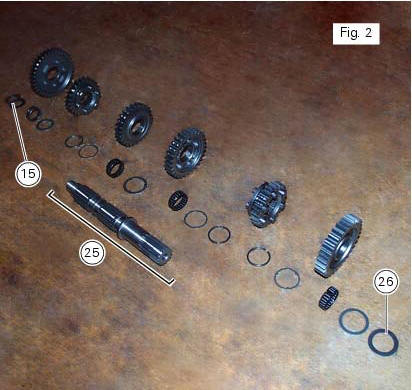
Figure 2 shows all the parts to be installed on the gearbox secondary shaft (25), with calculated end shims (15) and (26) (sec. 9 - 9.2, Reassembly of the crankcase halves).
Reassemble the gears on the gearbox shafts by reversing the disassembly procedure.
Take particular care when installing the idler gears. The assembly of the 3rd and 4th speed gears and the relative fixing components on the secondary shaft is given as an example.
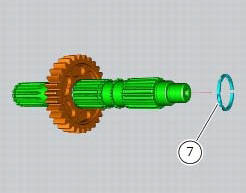
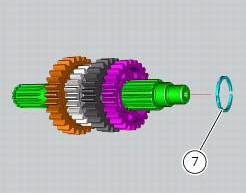
Fit the circlip (7), checking that it is fully inserted into its groove on the shaft. Push the circlip into position with a suitable size tubular drift.
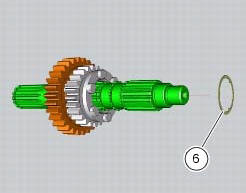
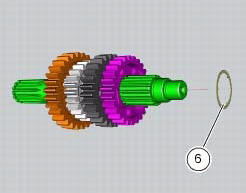
Slide the washer with three internal points (6) over the shaft until it locates against the circlip you have just fitted.
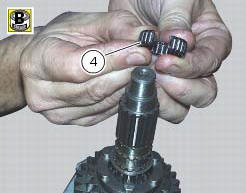
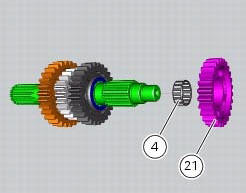
To fit the needle roller cage (4) onto the shaft, first lubricate it with plenty of grease (of recommended type) and then open it slightly to make it easier to slide on to the shaft.
Fit the 3rd speed gear (22).
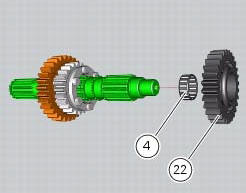
Fit on the gear the three-pointed washer (12), which can be distinguished from its counterpart (6) by its bigger outside diameter.
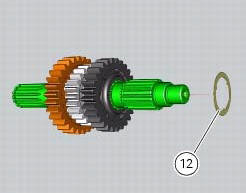
Fit another needle roller cage (4) using the method already described.
Fit the 4th speed gear (21).
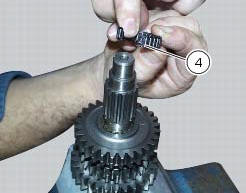
Fit another safety washer (6) and another circlip (7) into the shaft. Push it inside its seat using the previously used pad.
 Inspection of the gear selector drum
Use a gauge to measure the clearance between fork pin and the slot on the
selector drum.
If the service limit is exceeded, determine which part must be replaced by
comparing these dimensions wi ...
 Reassembly of the gearbox
To refit the gearbox components follow the procedure under sect. 9 - 9.2,
Reassembly of the crankcase halves, relating to
reassembly of the engine crankcase.
As a final practical test, ensure th ...
Other materials:
Seat
Seat
Seat cover
Rubber mounting
Special screw
Plate
Latch
Spare parts catalogue
Diavel abs seat
Diavel carbon
abs
seat
Important
Bold reference numbers in this section identify parts not shown in the
figures alongside the text, but which can be found in
the exploded view ...
Headlight aim
The motorcycle must be perfectly upright with the tires inflated to the
correct pressure and with a rider seated, perfectly
perpendicular to the longitudinal axis.
Position the motorcycle 10 metres from a wall or a screen.
On the wall or surface, draw a horizontal line at the same height fr ...
Immobilizer override procedure
This procedure makes it possible to "temporarily" turn on
the motorcycle if the hf (hands free) system is not working.
Note
The pin code function must be activated by entering
your 4 digit pin in the instrument panel, otherwise the
vehicle cannot be turned on temporarily in the case ...