
Ducati Diavel Service Manual: Refitting the gear selector lever
Position the gearbox drum selector fork in the centre of the gear rollers.
Position the gear selector lever (21) together with control shaft, spring and plate into the chain-side crankcase half.
Insert the screws (18) and (20) with the spacer (19).
Temporarily fit gear change lever (or a service lever) and engine pinion and shift to neutral gear.
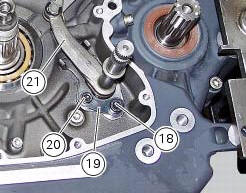
Place the tool 88713.3334 On the gear claw.
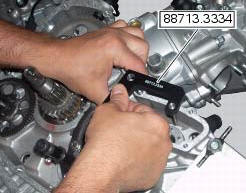
Place the tool 88713.3334 Inserting the clutch rod (e) into the tool hole, block the pin (f) of the tool in the gear claw pressing with the hand in the point (g) (claw stroke lock plate) towards the right, as shown in photo.
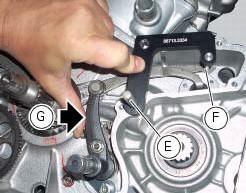
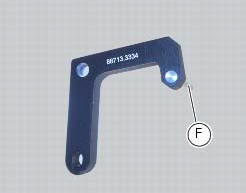
Tighten the screw (18) in this position to a torque of 36 nm (min. 34 Nm - max. 38 Nm) and screw (20) to a torque of 16 nm (min. 15 Nm - max. 17 Nm) (sect. 3 - 3, Engine torque settings).
Warning
Make sure that the gear selector lever fixing screws (18) and (20) are those indicated in our spare parts catalogue. They Must be screws of class 12.9 In order to respect the tightening torque indicated above (sect. 3 - 3, Engine torque settings).
Start tightening the first screw (18), and continue with screw (20).
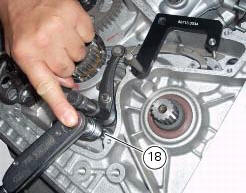
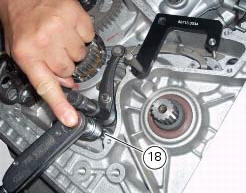
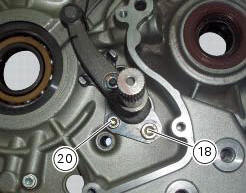
Remove service tool no.
Check that the pin (h) placed on the gear drum is axially to the notch (l) on the gear claw (with gear in neutral).
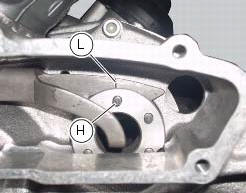
With the gearbox in neutral, check that the lever travel is the same when shifting up and down. The same should apply when a gear is engaged.
Operate the gearchange lever and turn the front sprocket at the same time to check that all the gears engage when shifting up and down.
Remove the previously installed lever and sprocket.

 Refitting the gear interlock plunger and pawl assembly
On the special screw (3), fit the gear pawl lever (4), orienting it as shown
in the figure, the washer (2) with the square
edge side (d) facing the clutch-side crankcase half, and the spring (1),
...
 Gearbox shafts
Shim, thickness 1
Gearbox primary shaft
Shim, thickness 0.5
Needle roller bearing
5Th speed driving gear
Splined washer, thickness 0.5
Circlip
3Rd- 4th speed driving gear
6Th sp ...
Other materials:
Refitting the expansion tank
If the support (15) has been removed, place the hose clamps (14) on the
bracket (15) orienting them as indicated.
Fully press the pins (a) to block the clamps (14) until pins surfaces (b) are at
the same level of the clamps (14) surfaces.
Apply recommended threadlocker to the thread of the ...
Refitting the shock absorber support
If you had removed them, apply recommended grease on the threads of the
adjusters (4) and the ring nuts (3) having
care not to have grease on the surface (c) of the adjusters.
Tighten the adjusters on the ring nut side opposite to that featuring flats
until bringing the surfaces as close as ...
Checking valve lift
Set the engine to the configuration described for the "checking and adjusting
the valve clearances", previously indicated.
Position the tool 88765.1518 On the cylinder head: the part marked "a" should be
on the intake side and the part
marked "s" should be on the exhaust side.
Seat the pl ...